LOAD TESTING VỚI LOCUST (P2) THỰC THI CÙNG CÁC OPTION NÂNG CAO

Ở bài viết trước LOAD TESTING VỚI LOCUST (P1) BASIC, chúng tôi đã giới thiệu cách cài đặt và chạy 1 loadtesting cơ bản với locust. Trong bài viết này, tôi sẽ hướng dẫn anh em cách config các tuỳ chọn nâng cao hơn với locust.
1. Các tham số có thể config khi chạy test với locust
- Locust có thể được config qua rất nhiều tham số trên command line, biến môi trường hoặc trong config file
- Các bạn có thể dùng
locust --helpđể hiển thị danh sách các tham số đó
| Command line | Environment | Config file | Description |
|---|---|---|---|
| -f, --locustfile | LOCUST_LOCUSTFILE | locustfile | file path hoặc đường dẫn tới module chứa locustfile (.py) |
| -H, --host | LOCUST_HOST | host | host để thực hiện load test, default là localhost:8080 |
| -u, --users | LOCUST_USERS | users | số user đồng thời cao nhất, có thể tăng giảm khi chạy (phím w, s) |
| -T, --tags | LOCUST_TAGS | tags | những tag mà bạn muốn bao gồm khi thực hiện test |
| --csv | LOCUST_CSV | csv | path out file csv, chứa các thông số thống kê về lượt test |
| html | LOCUST_HTML | html | path out file report dưới dạng html |
| --logfile | LOCUST_LOGFILE | logfile | path out log file |
Trên đây chỉ là những option hay được sử dụng nhất, ngoài ra còn có nhiều option khác, chúng ta có thể tham khảo tại: https://docs.locust.io/en/stable/configuration.html#all-available-configuration-options
2. Chạy locust trên command line.
- Tôi có sẵn 1 file
netflix_job.pynhư sau:
from locust import HttpUser, task

class Candidate(HttpUser):

    @task
    def netflix_job(self):
        res = self.client.get("/search?q=developer")
        print("Result code of searching developer job on netflix:", res.status_code)
- Cấu trúc source test:
load_test
├── locustfiles
│   └── netflix_job.py
└── report- Command chạy test:
locust -f locustfiles -H https://jobs.netflix.com --html report/report.html --headless—headlessở đây giúp locust chạy không thông qua UI (trên browser).- Kết quả
[2024-04-30 16:11:00,925] Kunkka07.local/INFO/locust.main: No run time limit set, use CTRL+C to interrupt
[2024-04-30 16:11:00,925] Kunkka07.local/INFO/locust.main: Starting Locust 2.26.0
Type     Name                                                                          # reqs      # fails |    Avg     Min     Max    Med |   req/s  failures/s
--------|----------------------------------------------------------------------------|-------|-------------|-------|-------|-------|-------|--------|-----------
--------|----------------------------------------------------------------------------|-------|-------------|-------|-------|-------|-------|--------|-----------
         Aggregated                                                                         0     0(0.00%) |      0       0       0      0 |    0.00        0.00

[2024-04-30 16:11:00,926] Kunkka07.local/INFO/locust.runners: Ramping to 1 users at a rate of 1.00 per second
[2024-04-30 16:11:00,926] Kunkka07.local/INFO/locust.runners: All users spawned: {"Candidate": 1} (1 total users)
Result code of searching developer job on netflix: 200
Result code of searching developer job on netflix: 200
Result code of searching developer job on netflix: 200
Type     Name                                                                          # reqs      # fails |    Avg     Min     Max    Med |   req/s  failures/s
--------|----------------------------------------------------------------------------|-------|-------------|-------|-------|-------|-------|--------|-----------
GET      /search?q=developer                                                                3     0(0.00%) |    551     301     899    450 |    0.00        0.00
--------|----------------------------------------------------------------------------|-------|-------------|-------|-------|-------|-------|--------|-----------
         Aggregated                                                                         3     0(0.00%) |    551     301     899    450 |    0.00        0.00

Result code of searching developer job on netflix: 200
Result code of searching developer job on netflix: 200
Result code of searching developer job on netflix: 200
- Cấu trúc folder sau khi chạy test.
load_test
├── locustfiles
│   ├── __pycache__
│   │   └── netflix_job.cpython-312.pyc
│   └── netflix_job.py
└── report
└── report.html- File report:
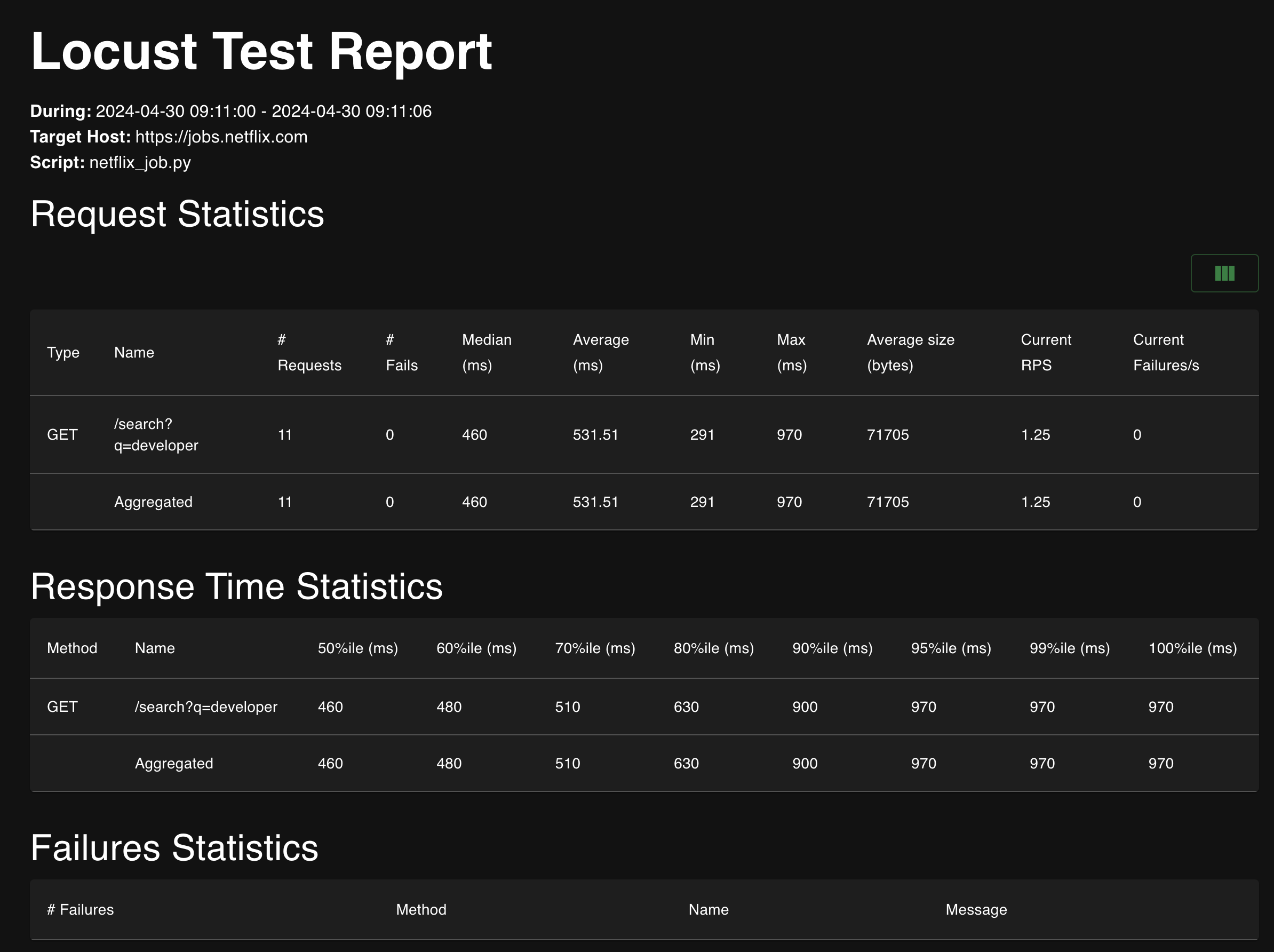
3. Chạy locust với file config.
- Để chạy locust với file config, chúng ta thêm 1 file locust.conf với nội dung cơ bản như sau:
locustfile = locustfiles
host = https://jobs.netflix.com
html = report/report.html
Các bạn có thể thêm các option khác tuỳ ý, khi muốn chạy locust với nhiều option thì dùng file config là biện pháp tốt hơn so với truyền chúng vào command line.
- Cấu trúc folder mới:
load_test
├── locust.conf
├── locustfiles
│   └── netflix_job.py
└── report- Command:
Lần này để chạy test, chúng ta cần thêm tham số —config để xác định path tới file config.
locust --config locust.conf --headless -u 5 Tôi đã thêm -u 5 để chạy với 5 user đồng thời.
- Output:
Cơ bản sẽ giống với chạy trên command line
[2024-04-30 16:26:43,781] Kunkka07.local/INFO/locust.main: No run time limit set, use CTRL+C to interrupt
[2024-04-30 16:26:43,781] Kunkka07.local/INFO/locust.main: Starting Locust 2.26.0
Type     Name                                                                          # reqs      # fails |    Avg     Min     Max    Med |   req/s  failures/s
--------|----------------------------------------------------------------------------|-------|-------------|-------|-------|-------|-------|--------|-----------
--------|----------------------------------------------------------------------------|-------|-------------|-------|-------|-------|-------|--------|-----------
         Aggregated                                                                         0     0(0.00%) |      0       0       0      0 |    0.00        0.00

[2024-04-30 16:26:43,782] Kunkka07.local/INFO/locust.runners: Ramping to 5 users at a rate of 1.00 per second
Result code of searching developer job on netflix: 200
Result code of searching developer job on netflix: 200
Result code of searching developer job on netflix: 200
Result code of searching developer job on netflix: 200
Result code of searching developer job on netflix: 200
Type     Name                                                                          # reqs      # fails |    Avg     Min     Max    Med |   req/s  failures/s
--------|----------------------------------------------------------------------------|-------|-------------|-------|-------|-------|-------|--------|-----------
GET      /search?q=developer                                                                5     0(0.00%) |    525     267     857    490 |    0.00        0.00
--------|----------------------------------------------------------------------------|-------|-------------|-------|-------|-------|-------|--------|-----------
         Aggregated                                                                         5     0(0.00%) |    525     267     857    490 |    0.00        0.00

Result code of searching developer job on netflix: 200
Result code of searching developer job on netflix: 200- Cấu trúc folder sau khi chạy test:
load_test
├── locust.conf
├── locustfiles
│   ├── __pycache__
│   │   └── netflix_job.cpython-312.pyc
│   └── netflix_job.py
└── report
    └── report.html
Ta có thể thấy file report. (Kết quả cũng không khác nhiều so với khi trước)
4. Kết luận
- Trong bài viết này, tôi đã giới thiệu cho anh em các option cơ bản khi chạy locust test.
- Cách chạy locust test với các option được truyền từ command line, hoặc trong file config.
- Trong các bài viết tới, tôi sẽ giới thiệu việc kết hợp Locust với Docker. 🤩
Cảm ơn anh em