lgtm - Read What Your Agent Wrote#
██╗      ██████╗ ████████╗███╗   ███╗
██║     ██╔════╝ ╚══██╔══╝████╗ ████║
██║     ██║  ███╗   ██║   ██╔████╔██║ 👍
██║     ██║   ██║   ██║   ██║╚██╔╝██║
███████╗╚██████╔╝   ██║   ██║ ╚═╝ ██║
╚══════╝ ╚═════╝    ╚═╝   ╚═╝     ╚═╝
lgtm is a terminal diff reviewer for agentic coding. It runs in a pane beside your agent, shows what changed as it changes, and lets you point at exact lines when you reply.
You keep your editor, and review code with vim motions. hjkl, w b e, f t F T, / and n, V to select, zz to centre - the ones already in your fingers, now pointed at the agent's work.
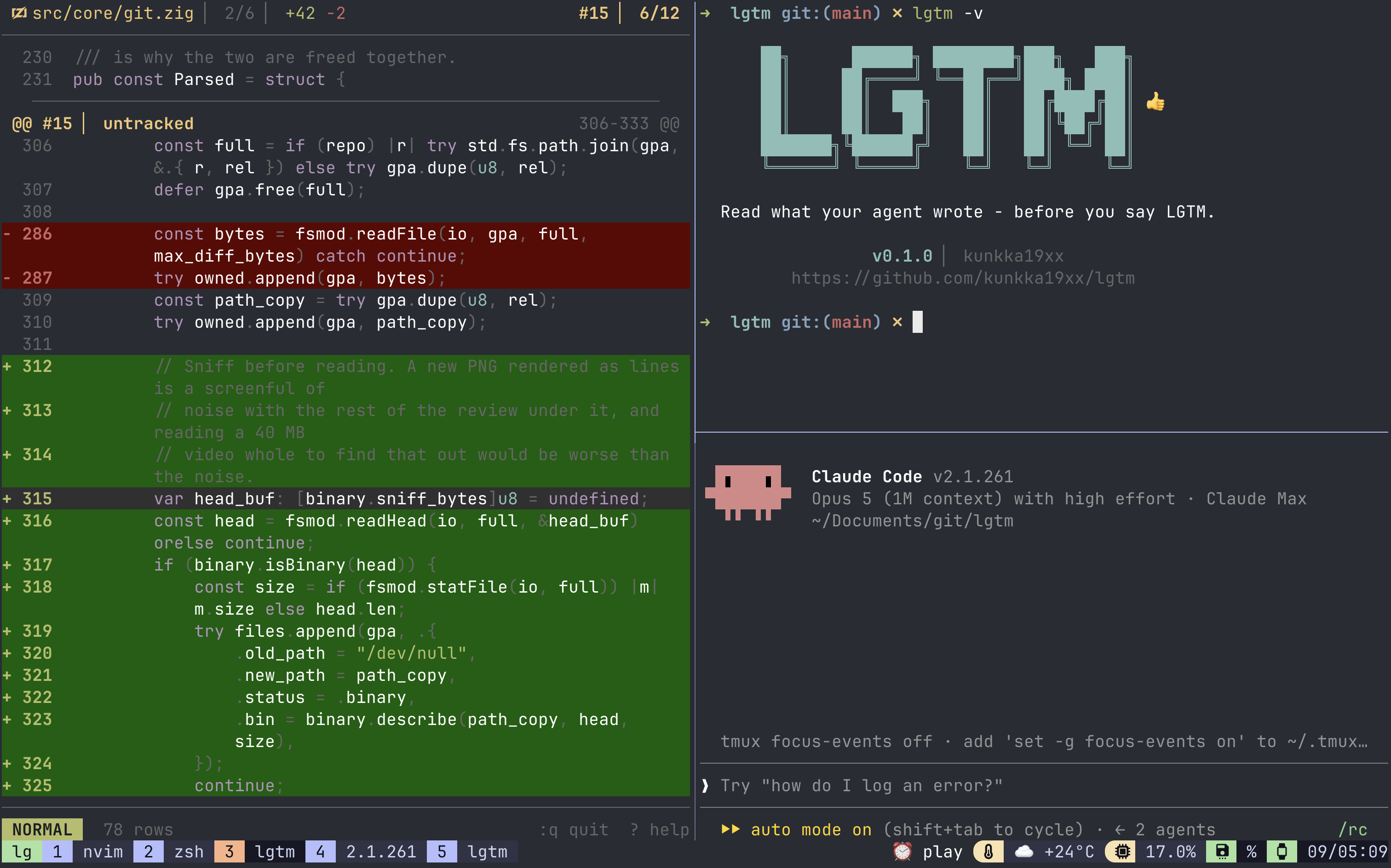
Status: pre-alpha, and used daily by its author. It began as a Go tool for reading diffs in a terminal, and is now a rewrite in Zig rebuilt around a coding agent rather than a person: the diff re-renders as the agent writes, references go straight to its input, and comments follow the code when it rewrites the file underneath them.
Why#
Reviewing an agent is not reviewing a person: more code, arriving faster, with no prior about where the risk is.
Without this, the loop goes - the agent edits six files, you scroll git diff in a pager, you spot something at src/auth.zig:47, and you retype that path into the chat. lgtm removes the retyping.
- Live - polls every 500 ms; nothing to re-run, nothing to refresh
- Vim motions - the review is a buffer, not a pager
- One keystroke to the agent -
Entersends#3 src/auth.zig:47into your agent's input box, never submitted - Comments that survive rewrites - they follow the code when the agent moves it, and say so when they cannot be placed
- Pull requests, as conversations - list them, read the review already on one, reply to a thread, edit and delete your own remarks on the forge, post yours back as a GitHub review, suggest a change the author applies with one click
- Snapshots - every turn the agent takes, in git's own object store, including the tree before it started
- Weakened-test detection - a deleted test, an added
skip, a body that stopped asserting - A front end for git -
lgtm statusandlgtm riskanswer what git answers badly or not at all, and every other word goes straight through to git, soalias git=lgtmholds - Twenty languages highlighted - including Markdown, drawn as Markdown rather than as speckled prose
- English or Japanese -
[ui] language, for everything the TUI draws - Plain files - comments as jsonl, reviews as markdown, all under
.lgtm/
Numbers#
Measured on Linux x86_64, the dist build (ReleaseSmall, stripped), in the lgtm repository:
| Measurement | Result |
|---|---|
| Binary | 1.2 MB, against a 6 MB CI budget |
| Re-diff parse | 0.11 ms for a 5,100-line diff across 34 files |
| Weakened-test scan | 0.75 ms on the same diff |
| Re-anchoring comments | 100% across the fixture set (26/26), 0.48 ms per 50 |
Where to go next#
| Page | What's there |
|---|---|
| Installation | Every install path, and what else you need |
| Getting Started | First run, the loop in five minutes |
| Reading the Diff | Motions, search, hunks, files, views, highlighting |
| Talking to the Agent | References, the compose box, presets |
| Comments | Collect a dozen remarks, submit once |
| Pull Requests | Review a request, reply to a thread, post back to it |
| The Mark | What arrived since you last read, and weakened tests |
| Snapshots | Turns, restore, and getting your work back |
| Instead of git | lgtm status, lgtm risk, and the fall-through |
| Keyboard Shortcuts | Every key, in one place |
| Configuration | Every setting in config.toml |
| Theming | Seven bundled themes and every colour slot |
| Keybindings | Rebind anything; every command name |
| Terminals | Which terminals lgtm can type into |
| Troubleshooting | When something doesn't work |
Installation#
macOS#
From the tap:
brew install kunkka19xx/tap/lgtmLinux and macOS (install script)#
Any Linux distribution, and macOS; arm64 and x86_64. The Linux build is statically linked, so there is no libc to match and no distribution to be right about - this is the path on Debian, Ubuntu, Fedora, Alpine, openSUSE and anything else without an entry below.
curl -fsSL https://raw.githubusercontent.com/kunkka19xx/lgtm/main/scripts/install.sh | shThe script needs no sudo - one binary goes in ~/.local/bin - and it will not install over a copy something else manages. It verifies every download against the SHA256SUMS published in the same release and stops on a mismatch.
scripts/install.sh --dry-run          # say what it would do, do nothing
scripts/install.sh --version v0.1.5
scripts/install.sh --dir /opt/bin
scripts/install.sh --uninstall
Arch Linux#
From the AUR, with whichever helper you use, or none:
paru -S lgtm-bin     # or: yay -S lgtm-bin
git clone https://aur.archlinux.org/lgtm-bin.git && cd lgtm-bin && makepkg -si
lgtm-bin is the release binary and needs no toolchain. lgtm-git builds main instead and needs zig, which is in extra for both architectures.
Nix#
The flake exposes the binary as a package, not just a dev shell:
nix run --refresh github:kunkka19xx/lgtm          # run it once, install nothing
nix profile add --refresh github:kunkka19xx/lgtm  # keep it on PATH
nix run builds into the store and runs it - nothing joins your profile or your PATH, and the next nix-collect-garbage reclaims the build, so trying it costs nothing. nix profile add is the one that persists; nix profile remove lgtm undoes it. Both need flakes enabled. (nix profile install is the old spelling of add, and warns.)
`--refresh` belongs on both, first install included. Nix caches what a github: ref resolves to for an hour (tarball-ttl), and inside that window it never asks GitHub again - so without it a nix run can rebuild a revision that is already stale, and a later upgrade can hand you back the build you were trying to replace.
Upgrading is its own command#
nix profile upgrade --refresh lgtmRunning add again is not an upgrade. A profile entry is locked to the commit it was installed from and add will not install over itself, so repeating the install line leaves the old entry exactly where it was; --refresh re-checks where the github: ref points, not where your entry is pinned. upgrade re-resolves the URL the entry was added with and re-locks it.
If your Nix named the entry something other than lgtm, nix profile list shows the name alongside the locked commit and the store path - which is also the quickest way to confirm that a stale entry, and not the release, is why lgtm -v still prints the old number. nix profile remove lgtm followed by the add line does the same thing in two steps and always works.
Two things can then make a successful upgrade look like it did nothing. A shell that has already run lgtm remembers the path it resolved, and ~/.nix-profile does not change when the store path behind it does: run rehash (zsh) or hash -r (bash) in any long-lived pane - which is why a tmux session left open across the upgrade is usually the one still reporting the old version. And an lgtm already running keeps the binary it started with until you quit it. readlink -f "$(which lgtm)" settles it: the store hash changes on a real upgrade, whether or not lgtm -v does.
From source#
Needs Zig, the version pinned in .zigversion:
make local          # build and install to ~/.local/bin
make clean-local    # remove it, restoring whatever it displaced
make dev            # install as lgtm-dev, beside a packaged lgtm
make clean-dev      # remove that one
make local will not install over a symlink and will not delete a binary it did not write, so a copy from a package manager is safe from it. make dev goes further and gives the build its own name, which is what you want while working on lgtm with a released one installed: neither can shadow the other, and no shell can hand you the wrong one.
Windows#
There is no Windows build. io/input.zig and io/tty.zig are POSIX throughout, so that needs a port rather than a manifest.
What else you need#
git is required - lgtm reads git diff for a living. You can also type git through it: any word lgtm has no command of its own for is handed to git with your arguments untouched, so lgtm log -p and lgtm commit -m x work, and alias git=lgtm holds. See Instead of git.
tmux is optional but is what lets lgtm type into your agent's input box; without it, references go to the clipboard over OSC 52, which works over SSH. See Terminals for the full support matrix.
gh, logged in, is needed only to review a pull request. Without it every other part of lgtm works and :pr says what is missing.
Checking it works#
lgtm -v          # version, author, repository
lgtm             # in any git repository
In a directory that is not a repository, lgtm starts, says so, and lets you quit or talk to the agent. It never fails to start.
Getting Started#
Run lgtm in a pane next to your agent. It polls every 500 ms; there is nothing to re-run and nothing to refresh.
The loop in five steps#
| Step | Key | What happens |
|---|---|---|
| Read | j k, ]h, / | The diff against HEAD - staged, unstaged and untracked |
| Point | Enter | A reference like #3 src/auth.zig:47 lands in the agent's input box |
| Comment | Space c | Notes collect on the lines they belong to |
| Submit | Ctrl-s | Writes .lgtm/review-3.md, tells the agent, and marks what you read |
| Come back | ]m | The lines that arrived since the mark carry a bar in the gutter |
Configuring it#
There is nothing to configure to start: lgtm writes no config file and runs on compiled-in defaults. When you want to change one:
lgtm --init                              # ~/.config/lgtm/config.toml
lgtm --init --config .lgtm/config.toml   # this repository's, meant to be committed
Every line in the file it writes is commented out and shows the default, so it changes nothing until you uncomment something - and a default improved in a later release still reaches you. --init never overwrites a file that is already there. Configuration is the full reference.
Reviewing something other than the working tree#
| Command | What it shows |
|---|---|
lgtm | HEAD against the working tree - the default, and what the tool is about |
lgtm diff main | Your whole branch, including what you have not committed. Live: the tree is still the right-hand side, so it still updates as the agent writes |
lgtm diff main HEAD | Committed work only, as two trees. Static - nothing can move, so the watcher, the snapshots and the mark are all off |
lgtm --pr 123 | A pull request, the way GitHub shows one. Static, and it needs gh |
lgtm diff main..HEAD is the same as the third row, and --base and --target are the long spellings of both: lgtm --base main --target HEAD.
The badge says which: main or main..HEAD in the accent instead of NORMAL, because a diff against a branch looks exactly like a diff against HEAD and reading one as the other is the mistake worth preventing.
Without opening the pane#
Not every question needs a full screen. lgtm status prints what changed, by how much and when; lgtm risk prints what the change did to the tests and exits 1 if it weakened them. Every other word goes straight to git, so lgtm log -p and lgtm commit -m x work and alias git=lgtm holds. Instead of git is the whole of it.
Where things live#
Everything durable is a plain file in .lgtm/, which lgtm keeps out of your review with its own .gitignore:
| File | What it holds |
|---|---|
.lgtm/comments.jsonl | Your comments |
.lgtm/review-N.md | What Ctrl-s wrote |
.lgtm/state.json | The session, the turn count, where you read to |
.lgtm/config.toml | This repository's settings, if you commit one |
Kill lgtm and restart it; you lose scroll position and nothing else.
Reading the Diff#
What you are looking at is the diff against HEAD - staged and unstaged, with untracked files included. It re-renders as the agent writes.
Motions#
The motions are vim's, because they are already in your fingers:
j k h l, w b e, W B E, 0 ^ $, f t F T with ; and ,, gg and G, Ctrl-d and Ctrl-u, zz.
} and { move to the next and previous break - a blank line, or a hunk edge.
The wheel scrolls three lines, the same as the arrows. [ui] scroll_lines changes that, and 0 hands the mouse back to the terminal entirely - see Troubleshooting if a drag stops selecting.
Jumping around#
]h and [h walk hunks across the whole review; ]f and [f walk files. Both wrap, and say so when they do.
Every ]x has a Space nx spelling and every [x a Space px, for anyone whose terminal makes brackets awkward.
`;` repeats whichever jump you used last, and `,` goes back. After ]h they walk hunks, after ]w weakened tests, after n search matches. After f( they are vim's, exactly. That is the whole rule: ; is "that again", so the keystroke you spend most costs one key instead of two, and you never have to remember which family you are in. A second , keeps going back rather than turning round, the way vim's does.
Search#
/ searches the whole review, not just the file on screen. Matches highlight as you type. n and N step; Esc or :noh clears the highlight and keeps the pattern.
* searches for the identifier under the cursor, and # does it backwards. This is the review's most common question, now that a name has changed: where else does it appear? It costs one key. Matched whole, so * on id walks the places id is used rather than stopping in every width, valid and ident between them. / is still there when you mean a fragment.
Highlighting#
Twenty languages are described, by a lexer per language rather than a grammar engine: Zig, Go, Rust, C, C++, C#, Java, JavaScript, TypeScript, Python, Lua, Swift, SQL, HTML, CSS, JSON, YAML, TOML, Dockerfile and Markdown. Anything else is drawn as plain text, which is the honest answer rather than a guess.
[diff] highlight decides how the diff's own colour and the syntax colour share a row: "line" washes the whole changed row, "gutter" keeps the colour in the sign and the line number and leaves the code to the highlighting.
Markdown, drawn as Markdown#
Markdown is highlighted like everything else, and the hunk header names the section a change is in rather than only a line number - @@ #4 | Install beats @@ #4 when you are reading somebody's README. Inline code stands out, **bold** is bold and _italic_ is underlined, and fenced blocks are left alone because their contents are somebody else's language.
Tables keep their shape: the pipes and the dashed rule recede, the header row goes bold, and a body cell lexes on its own so inline code in one still reads as inline code. A list marker takes the accent - -, *, +, 1., 2), a task box, and a blockquote's > - because one marker per item is what says the line is an item, where a row of pipes is chrome that should get out of the way. ~~struck out~~ is struck.
A === or --- rule under a line of prose is that line's heading, so the hunk header names the section either way you write your headings. The rule is what is coloured, not the title above it - a title repainted only when the lexer happens to start above it would be bold at some scroll positions and not others. A link shows its target - [text](url), an image, and an autolink in angle brackets alike - with the brackets receding and what the link says left as the prose it is.
Underlined rather than italic, because tmux's own default default-terminal is screen-256color, whose terminfo has no italic at all: its standout capability is the italic escape, so a word of prose comes out as a reverse video block you cannot read. If your tmux config says set -g default-terminal "tmux-256color", which does have italics, then emphasis = "italic" under [theme] gets you the real thing.
What is not coloured is deliberate. A comma is a comma, and 1400 in an <img width> is a quantity in a sentence, not a literal - colouring them speckles a paragraph and paints a URL's digits a different colour from its letters. Emphasis is refused wherever it only looks like emphasis: some_flag and other_flag is two identifiers, 2 * 3 * 4 is arithmetic, and * item is a bullet.
The slots are heading, list_mark, strong, emphasis and strikethrough - see Theming.
Views#
Tab is zen: it hides the chrome. zw toggles soft wrap. The pipe key, or -, switches between side by side and the flow view; in the split view H and L focus the old or the new column.
The layout is responsive by default: side by side when the pane is wide enough, flow when it is not.
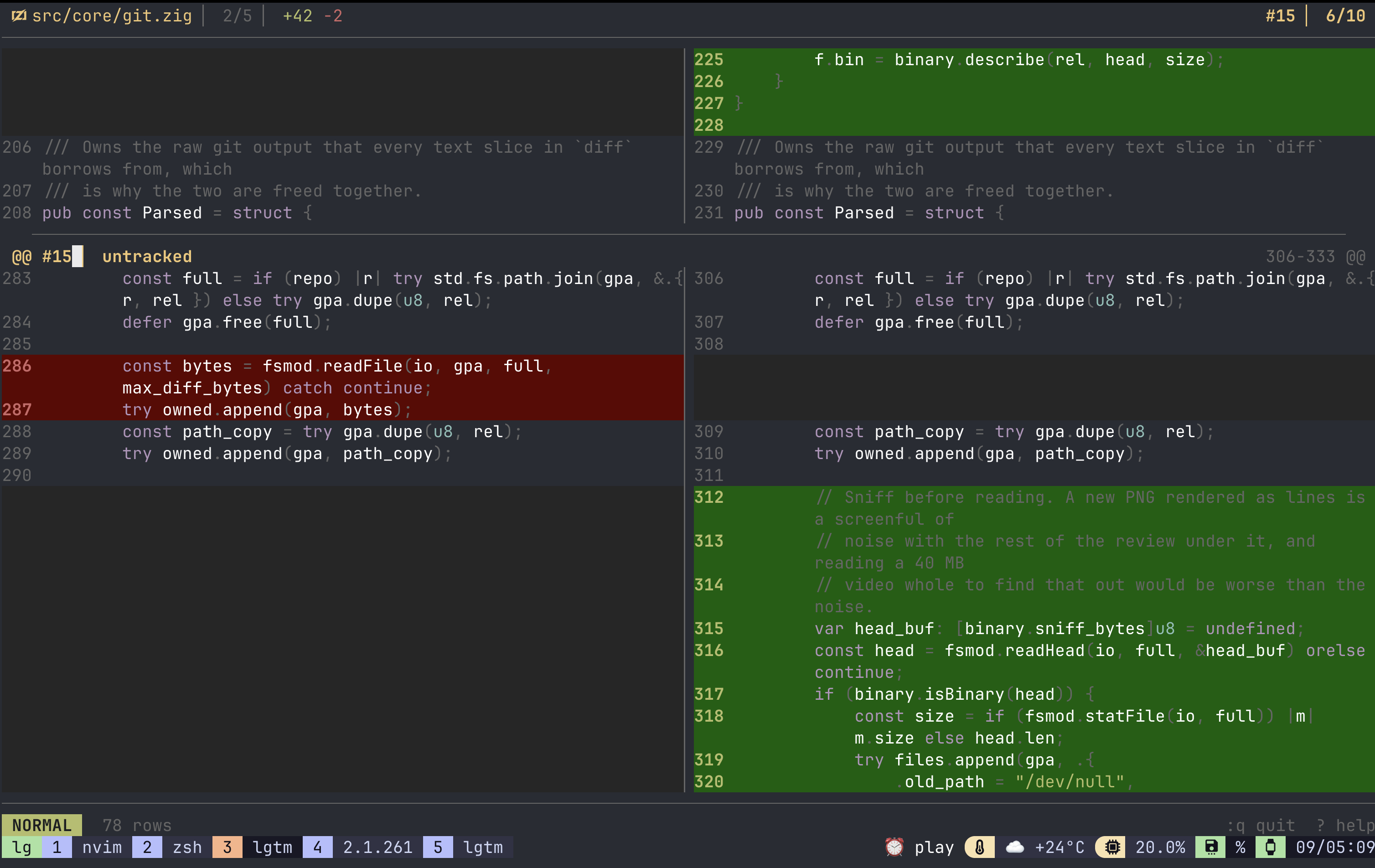
Side by side puts the old file on the left and the new on the right, with a filler block where one side has no line - the shape of what was added or taken away, rather than a hole in the middle of it:
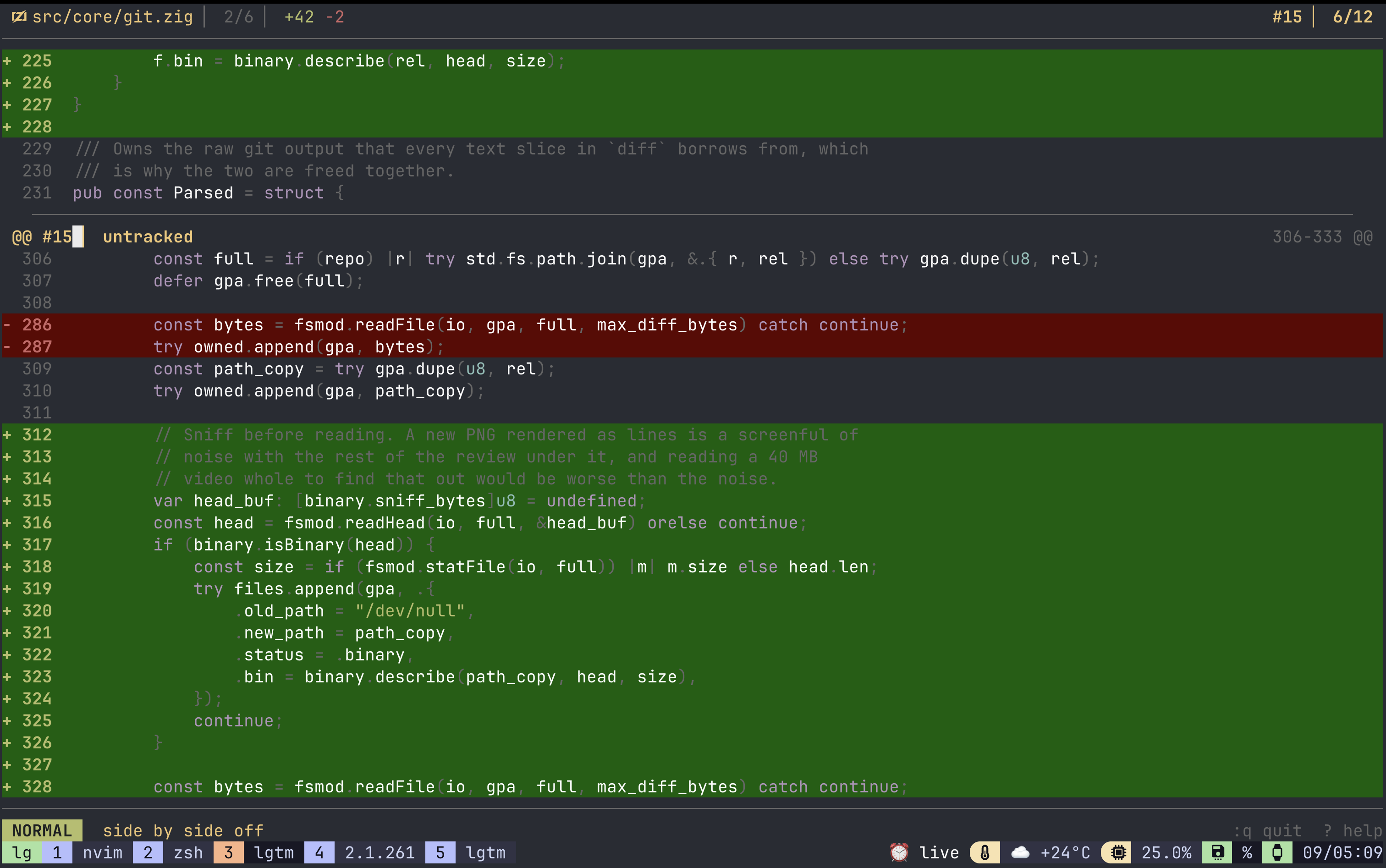
The flow view takes the whole pane for one column, and spends the four-column gutter a terminal without colour can still read:
Below 60 columns there is no side by side at all, whatever the setting says - that is a floor rather than a threshold. Shrinking a pane past it falls back to flow and widening brings the split straight back, because the layout you asked for is suspended rather than forgotten. See [diff] under Configuration.
More of the file#
Git shows three lines either side of a change. lgtm holds both whole files, so K and J pull more of the surrounding code in above and below the hunk the cursor is on, ten lines a press ([diff] expand_lines). The rule between two hunks means lines are hidden there, so it goes when they meet.
zc folds the context of the hunk under the cursor back again, the way it closes a fold in vim; the other hunks keep theirs, and zf folds the lot. On a file with no context pulled in, zc folds a large file opened with zo.
Files that moved#
A file that moved says so above its diff, in git's own spelling:
moved src/{old => new}/thing.zigA move with no edit in it has nothing else to draw, and the path in the header is only ever where the file ended up - so without that row an empty body is all you would see.
Reading anything, not just the diff#
Space f lists the changed files; Space F lists every file git knows about. An unchanged file opens whole, outside the review - still readable, still commentable. A file too large to render inline opens with zo.
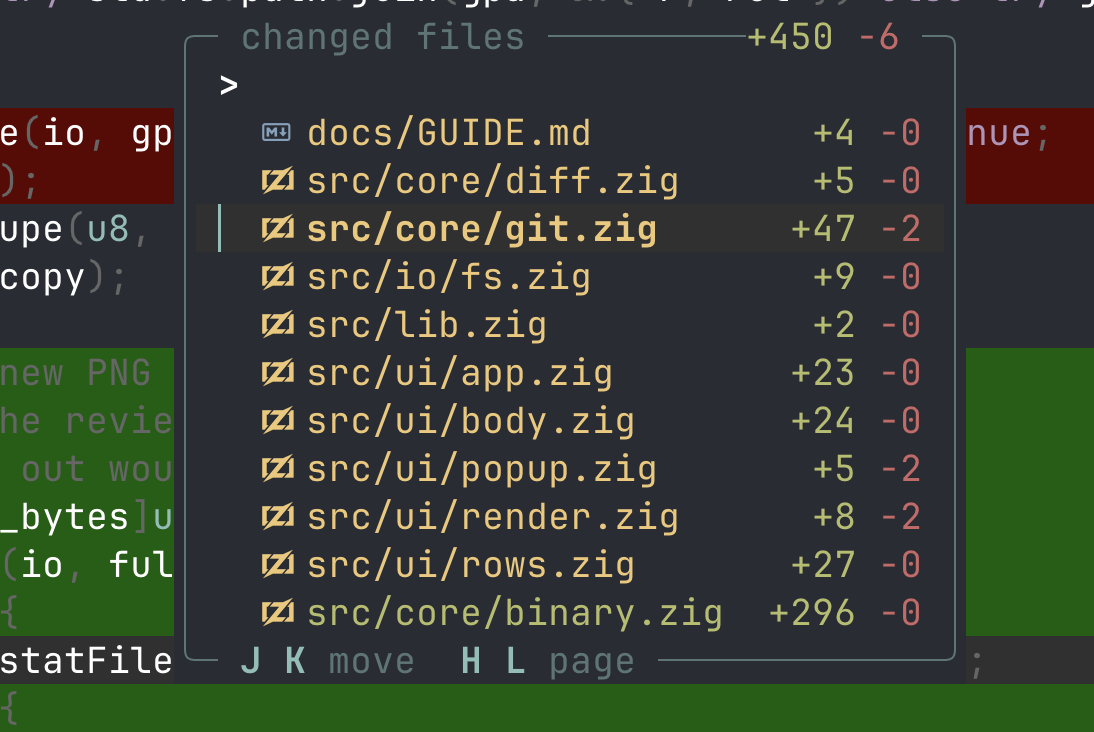
zi shows the files that [review] ignore hides. Hidden files are counted on the status line - nothing is ever hidden silently.
Space e opens the line under the cursor in $EDITOR. Ctrl-r re-diffs now.
Talking to the Agent#
This is the part that removes the retyping.
Pointing at a line#
Enter opens the compose box holding a reference to the line under the cursor:
#3 src/auth.zig:47Type what you want to say and Enter sends it - inserted into your agent's input box, never submitted, so you decide when to press return.
| Key | What it sends |
|---|---|
V then Enter | A line range: :47-52 |
v then Enter | The selected words themselves |
Space a | The box, with your [presets] list already open |
Space y | The reference to the clipboard instead of the agent |
Space Y | The reference and the lines |
y Y | Yanks the selected text, the way y does in vim |
If lgtm cannot type into your terminal, Enter degrades to the clipboard rather than failing - still a paste away. See Terminals.
Inside the compose box#
Esc leaves insert for normal mode, where the same vim motions work and o opens a line; a second Esc leaves the box. Nothing you type is deleted by either.
| Key | What it does |
|---|---|
Enter | Send |
Ctrl-i | Insert a preset at the caret |
@ | Insert a file path |
Ctrl-o | Line break. Ctrl-j and Shift-Enter are line breaks too, where your terminal sends them |
Ctrl-s | Save this as a comment and send it at once |
Ctrl-p | On a pull request: save it and post it |
In normal mode the box offers the review's motions plus gg G i a I A o O x D C dd cc d{motion} c{motion} u. The box follows the caret through a message taller than it is, rather than drawing from the top and cutting the rest off.
Presets#
Presets are the questions you ask most, kept as config so you type them once:
[presets]
why    = "why this approach?"
perf   = "is this hot path allocating?"
test   = "add a test covering this"
revert = "revert this, keep the rest"
A preset is inserted at the caret and deletes nothing, so you can drop one into a sentence you are half way through.
Rewriting what gets sent#
Every sentence lgtm sends your agent is a template you can override - see [templates] under Configuration:
[templates]
ref_single    = "look at {path} line {line}"
ask_test      = "{ref} - a table test, not a unit test"
submit_review = "please review {path} - {count} note{s} waiting"
Templates stay in the language you wrote them in. [ui] language changes what the TUI draws - notices, help, lists, badges, in English or Japanese - and never what is sent to your agent, which is this table.
Pull Requests#
The same review, pointed at somebody else's tree. Everything on this page needs gh installed and logged in; without it the rest of lgtm is unaffected.
Opening one#
lgtm --pr 123     # by number
lgtm --pr         # the current branch's
Or from inside, without restarting: :pr 123, :pr for the branch you are on, and :pr off to come back to the working tree.
A request is read the way GitHub shows one - the head against the commit it branched from, not against the tip of the base branch. It is static: no working tree is changing, so the watcher, the mark and the snapshot store all stand down.
Every call to the forge costs about a second. A spinner and a sentence say which one is in flight - opening #123, listing pull requests, posting to #123 - and the pane keeps drawing while it runs, so the keys you press are still read.
Picking one from a list#
Space lp lists the open requests. Each row is a number, a title and how big the read is; the state and the author appear only when the rows differ, because a word repeated down a list says nothing. Typing digits means the request's number rather than a digit in a title.
:pr list all takes in the merged and closed ones. :prs is the short spelling, and :pr 16 still goes straight to one you already know.
Its commits#
`Space lt` lists them, and `]t` `[t` walk them. A pull request has no agent turns; it has the commits its author built it from, newest first, with the whole request pinned on top as the way back. The badge reads COMMIT 3.
A commit is read only. Comments go on the whole request, where their line numbers mean something to GitHub.
The review already on it#
Opening a request reads what everybody else has said. Every inline remark comes down with the diff and sits in the gutter beside your own, in the comment list, and on ]c, carrying its author's name.
Replies come down with the remarks they answer, so a thread arrives as a thread: the messages are in the order they were written, and ]c walks every one of them rather than stopping at the first on a line.
- A remark whose line has gone from the diff arrives stale, rather than being placed somewhere plausible.
- Where a line carries several remarks the gutter dot shows the worst state on it, so a stale remark under an open one is still visible.
- They are never written to
.lgtm/, so opening the request again reads them fresh rather than showing you yesterday's.
If gh cannot reach the forge, the diff still opens and lgtm says only that it could not read the remarks.
A conversation is one row#
With [ui] comments = "inline" the message that starts a thread is shown with 2 more in this thread - Space vc to read under it, and the row wears the worst state in the conversation for the same reason the gutter dot does. Five messages stacked would be most of an eighty-column pane spent saying there are five.
Two remarks you wrote yourself on one line are two conversations and stay two rows. A reply that re-anchored to a different line is drawn on the line it actually sits on, not folded away under the message it answers.
In the comment list a conversation is one row too, marked +2 for the messages it stands for, and typing a word from any of them finds it - folding a conversation must not hide what was said in it.
Reading a thread#
`Space vc` on a line carrying a conversation opens it. Every message stacked, author and how long ago on each, the code the first one was written against above them, and your own marked (you) and selected when there is one.
| Key | What it does |
|---|---|
j k | Move between messages |
Ctrl-d Ctrl-u | Scroll a taller thread half a box at a time |
gg G | The ends |
Enter | Open the selected message to edit |
r | Answer the conversation |
d | Delete the selected message |
Esc or q | Close |
d rather than Ctrl-d, which is the half page here as it is in the diff.
The thread is also how you say which remark you mean. A line on an open request commonly carries somebody else's and your own; the selection is a comment rather than a line, and it stays behind when the overlay closes, so Space dc afterwards deletes the one you had highlighted.
On a line carrying one remark Space vc still opens the box directly, titled @author path:line - VIEW.
Replying#
`r` replies. A review is a conversation, so the overlay is not only a reading view: r on any message opens an empty box aimed at the thread, titled reply to @author on #16 path:line, and Enter says reply on the request.
It goes to GitHub as a reply to the remark that started the conversation, however deep in the thread you pressed it, which is the same thing the web does. The message appears on the thread as soon as the forge answers with an id for it, so there is no reopening the request to see what you just wrote. Ctrl-p does the same thing as Enter here, because on a box that only ever goes to the forge the key that means "post this" has nowhere else to mean.
Space rc is the same key outside the overlay, for the ordinary case of one remark alone on a line: that never opens a thread, and it is the remark most worth answering.
A reply lives on the request and nowhere else, so save + send and save + post are not offered, .lgtm/ never writes it, and a call that fails leaves the thread exactly as GitHub still has it. A remark you wrote here and have not posted yet has no thread to answer, and says so.
Editing and deleting your own#
Your own remarks on the request you can edit. lgtm asks gh who you are when it opens a request, so one you left on GitHub opens in the box the ordinary way, titled your remark on #16 path:line, and Enter says save on the request. The text goes to the forge and the copy in the pane waits to hear that it landed, so a call that fails leaves a remark here saying exactly what GitHub still says. save + send and save + post are not offered: it is already posted, and Space sc is how it reaches your agent.
Deleting one takes it off the request. d in the thread, Ctrl-d in the comment list and Space dc in the diff all reach the same place: your own remark on a request is deleted where it lives, with DELETE to the forge, because removing only the copy here would leave it on GitHub and bring it back on the next read.
It asks first - y deletes, any other key cancels - since nothing here can undo it and everybody watching the request sees it go. Asked from a box, the question takes its top border rather than the status row under it, which is the row the box is covering. The copy in the pane waits for the forge either way.
Somebody else's you cannot edit or delete. It lives on the request, and a changed copy here would say something its author never wrote. If gh cannot say who you are, every remark on the request opens to be read, which errs the safe way.
Posting yours back#
Your own comments are collected exactly as they are in a working-tree review. Then:
| Command | What it does |
|---|---|
:post | Hand every unposted comment to the request as one review |
:approve | The same batch, with an approval |
:request-changes | The same batch, requesting changes |
Ctrl-p | In the comment list: post just the highlighted one |
Anything typed after the command becomes the review's opening sentence: :request-changes the retry loop needs a backoff.
Posting and sending are separate facts, so a remark can go to your agent and to the author, and neither hides it from the other. Posting a second time sends only what is new.
A remark GitHub cannot attach to a line - one that went stale, or that sits outside the diff - travels in the review's body with its file and line rather than being dropped.
Suggested changes#
Space gc opens a comment already holding the selected lines inside a suggestion block, so you edit the code rather than describe the edit. Posted to a request it becomes a real suggestion the author applies with one click.
A suggestion block is drawn as the edit it is. Wherever a remark carries one - under the line, in the thread overlay, yours or somebody else's - the fence is not shown. What is shown is the lines it replaces and the lines it proposes, signed and coloured the way the diff signs and colours them, because that is the comparison you were going to make in your head anyway. Prose around the block stays prose. A suggestion whose line has gone from the diff still reads: there is nothing to show it against, so it shows what it proposes.
GitHub needs the range for that, which is why a three-line replacement has to be anchored to three lines. Nothing can be suggested for a line that is gone.
Comments are kept per request#
Remarks written on --pr 16 live in .lgtm/pr-16.jsonl and appear only while you are reviewing #16. Your working tree keeps its own in .lgtm/comments.jsonl. Remarks about somebody else's branch are not remarks about the tree on disk, and one file for both would re-anchor them onto whatever line they landed near.
What the agent is told#
A pull request is somebody else's tree, so src/config.zig:8 means nothing in your checkout. The review file opens by naming the request, the repository and the gh pr checkout that fetches it, and every reference sent on its own is prefixed PR #16.
The review file says who asked for what. Ctrl-s on a request writes the remarks already on it alongside your own, so the agent gets the whole review - and each one carries its author, with your own left unattributed. A thread is written as one conversation rather than as unrelated bullets that happen to share a line, and the sentence handed to the agent gives the split rather than one total: 3 of mine, 4 from the request. That sentence is submit_review_mixed under [[templates]](#configuration).
The Mark, and Weakened Tests#
Coming back to what's new#
Ctrl-s marks the working tree as read, and m does it by hand. When the agent revises, the lines that arrived since carry a bar in the gutter:
   1  fn login(u: []const u8) bool {
−  2      return check(u);
+  2      const t = trace(u);            ← was there when you marked
+┃ 3      if (!t) return false;          ← arrived since
+┃ 4      return check(u) and audit(u);
]m and [m walk those changes, M or :nomark drops the mark. The mark survives quitting lgtm: come back tomorrow and it still means the same thing.
The mark never hides anything. You are always looking at the whole diff against HEAD; the bars are an annotation on top of it.
Watching for a weakened test#
The failure with the worst consequences, and the one hardest to catch by reading: a test deleted because it failed, a skip added, a body that stopped asserting. It turns a red build green while looking like ordinary cleanup.
lgtm counts what a change did to its tests on every re-diff and says so on the status line:
1 test removed, 1 skip added, 1 fewer assertion]w and [w walk to them - to the removed declaration or the added skip, so you land on the thing rather than near it.
Detected by content, not by path, so it works for languages that keep tests in the source file. Two of the three signals are near-certain and lead; "fewer assertions" follows behind, because a refactor that merges two checks into one looks the same.
Zig, Go, Rust, C, C++, C#, Java, Lua, Python, Swift, JavaScript and TypeScript are described; anything else stays silent rather than guessing.
Asking the same question from a shell#
lgtm risk is this scan, printed and gone, and it exits 1 when something was weakened - so a build can ask too:
- run: lgtm risk --base origin/mainA removed test and an added skip fail it; a fallen assertion count needs --strict. See Instead of git for the output and the rest of the command line.
Snapshots & Turns#
lgtm snapshots the working tree whenever the agent stops writing, into git's own object store under refs/lgtm/**. The first snapshot is taken before the agent has written anything, which is the one nothing else could recover: uncommitted work is invisible to git until you lose it.
Walking the turns#
| Key | What it does |
|---|---|
]t [t | Walk the turns, ending at the working tree |
Space lt | List them: what each touched, when, how big |
R | Restore this file from the turn on screen |
u | Undo the last restore |
On a pull request these same three keys mean its commits instead: a request has no agent turns, so Space lt lists the commits its author built it from, newest first, and the badge reads COMMIT 3.
The list stays a screenful however long the session runs. The newest few turns are always drawn, and so are the mark, 0 original and the turn you are looking at; everything between them collapses into ⋮ 13 turns. Enter opens a fold, and typing anything opens all of them - a filter that skipped folded rows would be a filter that lies.
Four turns in a row on one file collapse too, as ⣿ 1-4 app.zig ×4: that is one piece of work that took four tries, not four things to read. A run never folds across a row that has something of its own to say.
Two markers that earn their place#
| Marker | Meaning |
|---|---|
↺ 4 | The agent undid its own work - this turn put a file back to exactly what turn 4 left. Round-tripping is what agents do when they are stuck, and it is nearly invisible in a diff, because a diff only shows the endpoints |
↩ | This turn touched a file you commented on - the agent answering you, as against doing something else |
A turn is read-only#
Comments, m and Ctrl-s refuse there and say why. The badge reads TURN 2 or BASELINE so you always know you are in the past, and grows a • when the working tree changes while you are back there - nothing updates under you, but you are told the world moved.
Restoring a file#
R takes a snapshot before it writes, asks before it writes, restores one file and no more, and then names the turn that undoes it. It is the only thing in `lgtm` that writes to your files.
u undoes that restore - one step, this session only. It refuses if anything has changed the file since, because then putting the old bytes back would not be undoing your action, it would be discarding whatever came after it. Going the other way is the move the notice names: [t to the turn it made, then R. That is the real mechanism; u is its shortcut.
They are ordinary git objects#
Without lgtm installed:
git show refs/lgtm/<session>/0:src/auth.zig    # the pre-agent version
git log --graph refs/lgtm/<session>/7          # the session
They are invisible to git branch and git status. git log --all walks every ref, so they do appear there. Deleting the refs is all it takes to be rid of them.
Pruning#
[snapshot]
keep = 36
Turns of the current session kept before the oldest are pruned; minimum 4. Pruning deletes refs; the objects go when git gc next runs.
Two turns are pinned whatever `keep` says: the baseline, 0 original, which is the tree as it was before the agent ran and the one snapshot nothing else can reconstruct; and the turn the mark sits on, which is what ✓, "since the mark" and ]m all point at. So lowering keep costs the middle of a long session and neither of its ends. Other sessions are never pruned - they are somebody's afternoon, and git shares the objects anyway.
Snapshots carry every changed file git reports, including ones [review] ignore keeps off the screen. That is deliberate: a file hidden from the review is still a file an agent can destroy, and the two kinds of ignoring are different questions. .gitignore is still respected.
Instead of git#
Not everything is worth opening a full-screen pane for. lgtm answers a handful of questions itself, prints them and exits, and hands every other word straight to git.
lgtm diff          # lgtm's own, and the reason this tool exists
lgtm status        # lgtm's own
lgtm risk          # lgtm's own, and git has no answer to it at all
lgtm log -p        # git's, unchanged
lgtm commit -m x   # git's
lgtm git diff      # git's diff, when that is the one you want
The words lgtm answers itself are diff, status, risk, themes, help and version. Six, and the list grows only where the answer here is better than the answer there. lgtm git <command> reaches past them.
The fall-through#
Any word lgtm has no command of its own for is handed to git with the arguments exactly as typed, and lgtm exits with git's exit code. The terminal is git's while it runs, so a pager still pages, a prompt still prompts, commit still opens your editor, and the colours are git's own.
What it cannot express, it hands to git. lgtm diff --stat, lgtm diff -- src/auth.zig, lgtm status --porcelain, lgtm diff a...b - none of those are things this tool has an answer for, and all of them are questions git was going to be asked anyway. They run, with git's output and git's exit code. The rule is one sentence: lgtm answers what it can, and everything else is git's, verbatim.
git init is not among the words lgtm takes, on purpose: writing an lgtm config is lgtm --init, so lgtm init makes a repository, the way a hand that typed it expected.
The first word decides. lgtm log --once sends --once to git, not to lgtm - once a word is git's, everything after it is too. A leading flag is never git's: lgtm --once is lgtm, and lgtm git -c core.pager=cat log is how an exotic git invocation gets through.
lgtm diff#
lgtm diff is the review this tool opens with no word at all, and it takes refs the way git writes them:
lgtm diff                # HEAD against the working tree
lgtm diff main           # your whole branch, uncommitted work included. Live
lgtm diff main HEAD      # committed work only, as two trees. Static
lgtm diff main..HEAD     # the same
--base and --target are the long spellings and mean exactly the same things. See Getting Started for what live and static change.
lgtm status#
One table, printed and gone: what changed, by how much, and when each file was last written.
 ○ B  logo.png                                  1d ago
 ● R  src/core/{old => new}/app.zig    +3   −3  2h ago
      src/ui/
 ◐ M    ├─ app.zig                    +12   −4  27m ago
 ● D    ├─ app_old.zig                  0  −99
 ○ A    └─ status.zig                +210    0  just now
   ?  notes.txt                        +4    0  1m ago

      6 files  +229  −106  against HEAD
      ● staged   ◐ both   ○ unstaged   ? untracked
M A D R B is modified, added, deleted, renamed, binary - a letter as well as a colour, because this output is usually a pipe and a pipe has no colours. A deleted file has no age: there is nothing left on disk to ask. A binary one has no counts: it has no lines.
The mark in front of the letter is how much of that file is in the index: ● all of it, ◐ some of it, ○ none of it. An untracked file has no mark and takes a ? instead of a letter - it is on neither side of the index, and showing it as A made it identical to a file deliberately staged for addition. The key only prints when the index has something to say: a tree where nothing is staged is every row marked ○, which needs no explaining.
The marks are glyphs as well as colours, for the same reason the letters are, and [ui] icons = "ascii" spells them * o .. With --target or --pr the column goes entirely: two refs have no index between them.
A directory holding more than one changed file becomes a header with its files under it - which is what makes the shape of a turn visible: six files under src/ui/ is one piece of work, six files in six directories is another. A lone file keeps its whole path, because one file is not a tree, and so does a rename that left its directory: src/{ui => core}/app.zig belongs to neither end.
Piped, the table stays flat - every row carries its whole path again, so lgtm status | grep src/ui and copying a path out of a row both keep working. Same rule as the colours. On a pane too narrow for everything, the ages go before the paths do.
It takes the same flags the review does, and means the same things by them: lgtm status --base main, lgtm status --pr 123, and [review] ignore - what the patterns kept out is counted in the last line rather than left silent. With --target or --pr the ages go: the file on disk is not the file being reported, and its mtime would be answering a question nobody asked.
lgtm risk#
The one question here that git cannot answer. git diff shows a deleted test and an added skip exactly the way it shows a renamed variable - as lines - and that is the part of a diff people skim. Weakening a test is the cheapest way to turn a red build green, and it is the change a reviewer is least likely to catch.
 src/auth.zig  2 tests removed, 3 fewer assertions
    5  − test "rejects an expired token" {
   10  − test "rejects a token from another issuer" {

 src/parse.go  1 skip added
    4  + t.Skip("flaky in CI")

 2 files check less than they did: 2 tests removed, 1 skip added, 3 fewer assertions
It exits 1 when something was weakened, so a build can ask too:
- run: lgtm risk --base origin/mainA removed test and an added skip fail it. A fallen assertion count does not, because a refactor that merges two checks into one looks the same from here, and a check that cries wolf is a check somebody switches off. --strict makes it fail on that too.
It reads content, never paths: Zig keeps its tests inside the source file, so a rule that only looked in tests/ would miss almost all of them. A rename nets to zero - one declaration left, one arrived - and a language nobody has described is silent rather than guessed at. It misses things rather than inventing them, which is the side to err on.
Inside the pane this is the same scan ]w walks, so a finding printed here is a place you can go and read. See The Mark for which languages are described.
Aliasing git to lgtm#
alias git=lgtmThis works, and it is what the fall-through is for. Everything git does, lgtm does - add -p, commit, rebase -i, push, log -p, stash list - with the terminal handed over, so pagers page and prompts prompt. What changes is the handful of questions lgtm answers better:
| You type | You get |
|---|---|
git diff | the review, in the pane |
git diff --stat, git diff -- path | git's, unchanged |
git status | the table, with counts and ages |
git status -s, git status --porcelain | git's, unchanged |
git risk | what the change did to the tests |
git help rebase | git's man page |
git add -p, everything else | git's, unchanged |
Two differences worth knowing before you put it in your shell rc:
git --versionandgit -vprint lgtm's banner, not git's.lgtm git --versiongets git's. Scripts are unaffected - a shell alias is not seen by scripts, by other programs, or by non-interactive shells.git diffopens a full-screen pane instead of printing. If you wanted the text,git diff --statand friends still print, andlgtm git diffprints the whole thing.
lgtm git <command> always reaches the real one, whatever the alias says.
From your phone#
Leave the desk and keep talking to your agents: see every one on your machine, read what each says, reply, and review what they changed, from an iPhone. Nothing goes through a cloud service. The phone talks to lgtm on your own machine over Tailscale, encrypted, from anywhere.
Set up#
- Install Tailscale on your machine and your iPhone, signed in to the same account.
- Install lgte. Until it is on the App Store, build it with Xcode from lgte.
- Start
lgtm serve, from any directory; a repository is where the phone's review starts:
lgtm serve --listen $(tailscale ip -4)

# an agent in any other terminal joins the list
lgtm agent claude
One lgtm serve serves the whole machine: every agent in tmux, herdr, WezTerm or kitty shows up, whichever repository it works in. kitty needs allow_remote_control yes, and listen_on when lgtm serve runs outside kitty.
lgtm agent hands the agent your terminal untouched: it looks and behaves exactly as it does on its own, and exits with the agent's exit code. The phone reads a copy. It is the way to use the phone from Ghostty, iTerm2 or a plain SSH session. Given --listen, it serves the machine itself.
Pair#
lgtm serve prints a QR code. In the app, tap Scan code; the iPhone's Camera app works too. The pairing belongs to the machine, kept in ~/.local/state/lgtm/serve-token and readable only by you, so the phone reconnects on its own after a restart. --new-token replaces it, and every paired phone scans again.
What the phone does#
- Agents: every agent on the machine, the one waiting for you first, with what it last said. Tap one for its screen, live, and swipe sideways for the next. Scroll up for what it did earlier, up to 2000 lines (not under
lgtm agent). The wrap button reflows long lines to the phone's width. Type and tap Send, and it lands in that agent's input and is submitted; hold Send to insert without pressing Enter. The paperclip sends a photo: it is saved in the agent's repository under.lgtm/attachments/, and its path lands in the agent's input for you to write around. The keyboard bubble beside the box opens a 3x3 grid right above it: the arrows as a d-pad, Esc and ^C above them, Shift-Tab and Tab below, or a keypad of the agent's choices while it waits. Esc and ^C wait a moment, so a second tap takes them back. - Review: the changed files of any repository an agent works in, starting with the one
lgtm serveruns in; pick another from the title, or from an agent's screen. Their diffs with syntax, and your comments. Tap a line to comment on it, and keep the comment for the review or send it to the agent now. Send writes the review to.lgtm/phone-review-N.mdand tells the agent working there where it is. Comments follow the code as the agent edits it. - State: under herdr, what each agent is doing and when it waits for you; elsewhere, working while its screen moves and idle once it stops.
The phone's comments are its own. The pane shows them in the gutter, as someone else's, and never sends them in your review. While a phone is attached the mode row says so, phone: iPhone; under lgtm agent, where the agent owns the screen, your terminal raises a notification when the phone opens it.
To open agents from the phone, list what it may open in [serve] agents (and extra places in [serve] dirs). + then asks which and where, and it opens without switching anything on your desk; swiping a card closes that agent, after asking.
One device at a time: a newly paired one takes over, and the one it replaced says so rather than fighting back. Only agents are listed; [serve] panes = "all" lists shells too.
Get a push when it needs you#
[notify]
url = "https://ntfy.sh/pick-a-long-random-topic"
With ntfy or Bark on the phone, lgtm pushes "claude is waiting for you" under herdr, or "went quiet" when an agent's screen has been still for 20 seconds, for every agent on the machine, while no phone is attached. See Configuration.
What to keep in mind#
A paired phone can type into any agent's terminal and press Enter, so treat the token like a key. lgtm serve only listens on this machine or its Tailscale address, never your local network, and refuses to start on anything else. The phone sees whole screens, including anything else that was run there. Everything a phone types is recorded in ~/.local/state/lgtm/serve.log, with the time, the device and the pane.
| Terminal | Reads the screen | Presses Enter | Says what the agent is doing |
|---|---|---|---|
| tmux, WezTerm, kitty | yes | yes | from its screen |
| herdr | yes | yes | yes |
| Ghostty | no, use lgtm agent | no | no |
lgtm agent | yes | yes | from its screen |
Keyboard Shortcuts#
? shows this list generated from your bindings, so a remapped keymap documents itself. What follows is the defaults.
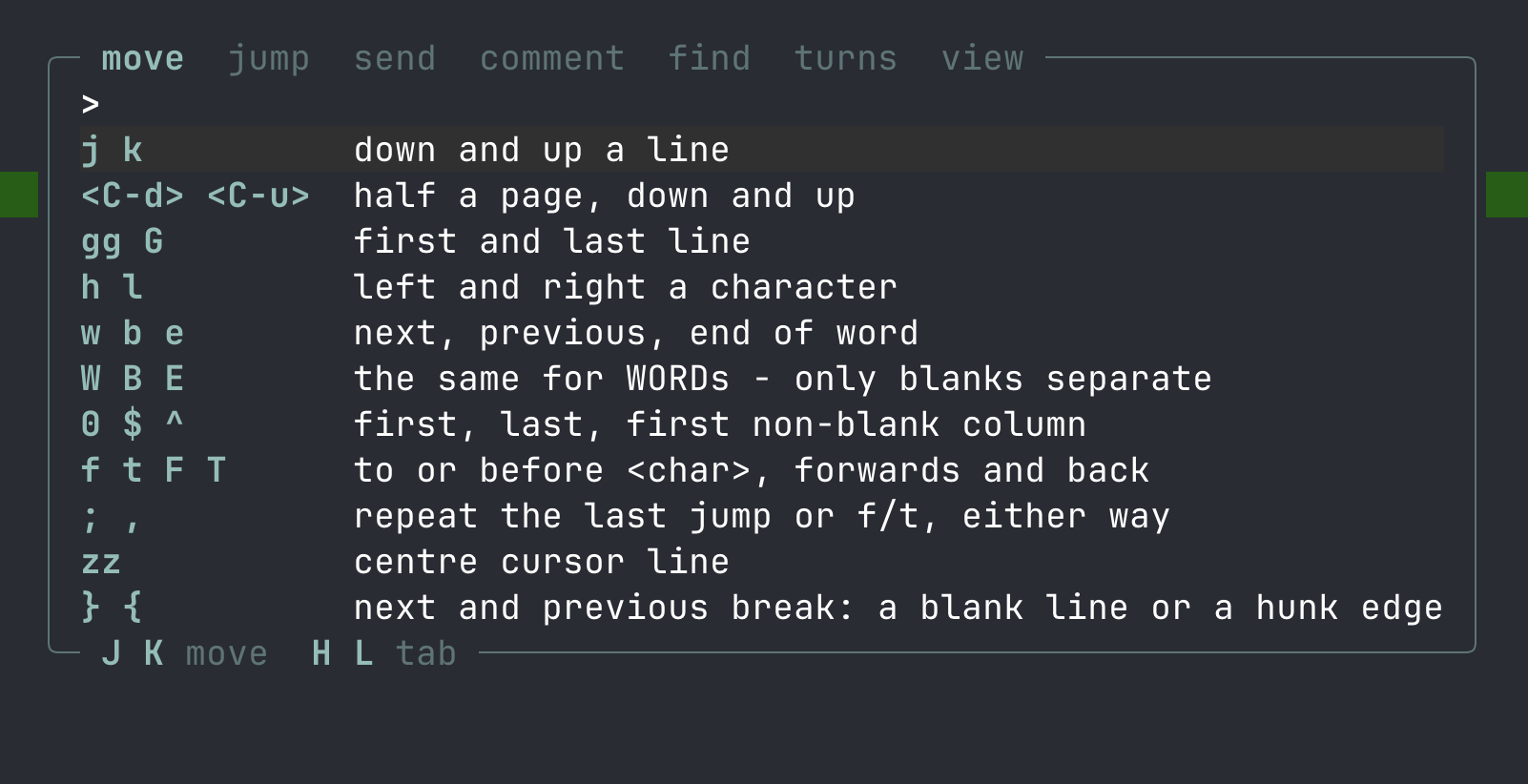
Moving#
| Key | What it does |
|---|---|
j k | Down and up a line |
h l | Left and right a character |
w b e | Next, previous, end of word |
W B E | The same over WORDs - only blanks separate |
0 ^ $ | First, first non-blank, last column |
f t F T | To or before a character on this line |
; , | Repeat the last jump, either way |
Ctrl-d Ctrl-u | Half a page |
| Wheel | Three lines, the same as the arrows ([ui] scroll_lines) |
gg G | First and last line |
} { | Next and previous break: a blank line, or a hunk edge |
zz | Centre the cursor line |
Jumping#
| Key | What it does |
|---|---|
]h [h | Next and previous hunk (wraps) |
]f [f | Next and previous file (wraps) |
]c [c | Next and previous comment |
]m [m | Next and previous change since the mark |
]t [t | Next and previous turn, or commit on a pull request |
]w [w | Next and previous weakened test |
/ n N | Search the review, then step |
* # | Search for the word under the cursor, forwards or back |
Space f | The changed files |
Space F | Every file in the project |
Every ]x has a Space nx spelling and every [x a Space px.
Talking to the agent#
| Key | What it does |
|---|---|
Enter | Compose a message about this line |
Space a | Compose, with the question list open |
Space y Space Y | Copy the reference, or the reference and the lines |
Space t | Pick the pane sends go to |
y Y | Yank the selection, or whole lines |
v V | Visual select, characters or lines |
Comments#
| Key | What it does |
|---|---|
Space c | Write one here |
Space gc | Suggest a change: a comment holding the selected lines |
Space vc | Open the nearest to read or edit, or its thread |
Space rc | Reply to the one here, on the request |
Space lc | List every comment |
Space sc | Send this one on its own |
Space dc | Delete the one here |
Ctrl-s | Submit the review, and mark what you read |
Pull requests#
Every one of these needs gh. See Pull Requests.
| Key | What it does |
|---|---|
Space lp | List the open requests; Enter reviews one |
:pr 123 | Review one by number. Bare :pr takes the current branch's |
:pr off | Back to the working tree |
:post | Hand the collected comments over as one review |
:approve :request-changes | The same batch, with a verdict |
Ctrl-p | In the comment list: post just the highlighted one |
Space rc | Reply to the remark on this line |
Space lt | List the request's commits; ]t [t walk them |
In a thread#
Space vc on a line carrying a conversation opens it. See Pull Requests.
| Key | What it does |
|---|---|
j k | Move between messages |
Ctrl-d Ctrl-u | Scroll half a box |
gg G | The ends |
Enter | Open the selected message to edit |
r | Reply to the conversation |
d | Delete the selected message |
Esc or q | Close |
Turns and the mark#
| Key | What it does |
|---|---|
m | Mark: everything after this is new |
M | Drop the mark |
Space lt | List the turns, or a pull request's commits. Typing a number finds one; typing a word searches the row |
R | Restore this file from the turn on screen |
u | Undo the last restore |
]w [w | Walk the weakened tests |
View#
| Key | What it does |
|---|---|
Tab | Zen: hide the chrome |
zw | Soft wrap long lines |
Pipe key or - | Side by side, or back to the flow view |
H L | Side by side: focus the old or the new column |
zi | Show the files [review] ignore hides |
K J | Show more of the file above or below this hunk |
zc | Fold this hunk's context back, or a file opened with zo |
zf | Fold every hunk's context in this file |
zo | Open a file too large to render inline |
Ctrl-r | Re-diff now |
Space e | Open this line in $EDITOR |
? | Every key, from your bindings |
: | Run any command by name; Tab completes |
:q | Quit |
The command line#
: runs any command by the name [keys] binds it by, so every command in the Keybindings list is typeable whether or not it has a key:
:next_file        :turn_list        :toggle_wrap
:q  :qa           :noh              :nomark
Tab completes. The first press extends to whatever every candidate shares, so :n becomes :next_ without choosing between them; the next presses cycle, and Shift-Tab goes back. The candidates appear on the line above, which is the rule the prompt was covering anyway, so nothing on screen moves to make room:
next_hunk  next_file  next_comment  next_turn  next_fresh  next_risk
:next_
If nothing starts with what you typed it falls back to a loose match, so :nf still reaches next_file.
The short spellings are vim's and mean the same as the long ones. A name that does not exist suggests the nearest one that does, and a command that only lives inside the compose box or a list says so rather than running somewhere it has no meaning. Neither the suggestion nor Tab will ever offer a command : would then refuse.
? shows the keys and : runs the names. Both read the same table, so neither can drift from what the tool actually does.
One name is not about the review at all. :tired drops the screen on the floor, where it stays, with a clock counting how long you have been away in a box over the heap. Whatever you press next sends every character back up the way it came down, onto the cell it started from, and then does whatever that key normally does. Try it at the end of a long session. It has no binding, because a key that does this by accident stops being funny the first time.
In a list#
J and K move, H and L page, Enter opens, Esc closes, and typing filters. Tab and Shift-Tab, the arrow keys, and Ctrl-n / Ctrl-p all move too.
In the comment list only: Ctrl-s sends the highlighted remark, Ctrl-x sends every open one as the review file, Ctrl-d deletes one, and on a pull request Ctrl-p posts one.
In the compose box#
Esc leaves insert then leaves the box, Enter sends, Ctrl-i inserts a preset, @ inserts a file path, Ctrl-o is a line break, Ctrl-s saves a comment and sends it at once, and on a pull request Ctrl-p saves and posts it. Ctrl-j and Shift-Enter are line breaks too where your terminal sends them.
The arrows move a line at a time; Ctrl-a Ctrl-e Ctrl-b Ctrl-f Ctrl-u Ctrl-w Ctrl-d are readline's. In normal mode: the review's motions plus gg G i a I A o O x D C dd cc d{motion} c{motion} u. The box follows the caret through a message taller than it is, rather than drawing from the top and cutting the rest off.
Configuration#
Two files, merged key by key:
~/.config/lgtm/config.toml     yours, everywhere
.lgtm/config.toml              this repository's
lgtm --init writes the first of these, and lgtm --init --config .lgtm/config.toml the second. Every line in what it writes is commented out and shows the default, so the file changes nothing until you uncomment something; it never overwrites a file that already exists.
The repository's wins where they disagree. .lgtm/ is ignored by the .gitignore lgtm writes there, except config.toml - so a project can commit its own settings without committing anyone's session state.
A bad setting never stops `lgtm` starting. It is reported on the status line with the file, the line and the key, and only that one key falls back to its default. This is a rule, not an accident: a review tool that refuses to open because of a typo is a review tool you stop running.
nav#
| Key | Default | What it does |
|---|---|---|
hunk_crosses_files | true | ]h carries into the next file at the end of one. False keeps hunk motions inside the current file, wrapping there |
scrolloff | 3 | Rows kept between the cursor and the edge. Clamped to a third of the body, so a large value on a short pane degrades instead of pinning the cursor to the middle |
mark_on_submit | true | Ctrl-s takes the mark as well as sending the review. False for a mark you want to span several rounds |
[nav]
hunk_crosses_files = true
scrolloff = 3
mark_on_submit = truediff#
| Key | Default | What it does |
|---|---|---|
layout | "auto" | "auto", "flow" or "split". flow is the one-column diff; split is side by side. auto is responsive: side by side when the pane is wide enough, flow when it is not. Switching views at runtime beats auto. "unified" is accepted as a spelling of "flow" |
highlight | "line" | "line" washes the whole changed row; "gutter" keeps the colour in the sign and the line number and leaves the code to the syntax highlighting |
split_min_width | 100 | Below this many columns, auto reads flow. Each side needs a line number, a sign, a gutter and about forty columns of code, with a divider between them; under that, side by side wraps so hard it shows less than the flow view. Minimum 60 |
expand_lines | 10 | Lines K and J pull in around a hunk each press. Git shows three either side and the buffers hold the rest, so this is how much of the rest arrives at a time. Between 1 and 500 |
[diff]
layout = "auto"
highlight = "line"
split_min_width = 100
expand_lines = 10
The wash colours are mixed from the theme rather than written per theme: the hue a fifth of the way over the theme's own background, so a palette that publishes a green and a background already says what its diff green is. The default terminal palette is built from 256-colour indexes, which cannot be mixed with anything, so it takes three from the fixed colour cube instead - stronger than a mix, and deliberately so. Set add_line, del_line or filler under [theme] to override any of them. filler is the side of a split row that has no line on it: the shape of what was added or taken away, rather than a hole in the middle of it.
[ui] wrap governs both views. A split row takes as many screen rows as its taller column needs, so the two sides stay aligned and neither is cut off at the divider; zw turns it off in the split view the same way it does in the flow view. Continuation rows follow the line's own indentation, capped at a third of the column so a deeply nested line still has most of it to wrap into; a review note wraps flush, because indentation in prose is whatever the writer happened to type. A file with no hunks - one opened whole with Space F - stays flow, because both of its sides would be the same text.
Below 60 columns there is no side by side at all, whatever layout says. That is a floor rather than a threshold: split_min_width is where auto stops choosing two columns, and 60 is where they stop being possible - a gutter of about five and twenty-four columns of code a side, plus the divider.
The two views spend different gutters. The flow view has the pane to itself and spends four columns: the sign, the column the mark's bar sits in, the number, and two after it - the first where a comment's dot goes, the second air the code reads better for. The split view has halved itself already and spends one: the number, and the single column between it and the code. That column is the separator, the comment's dot and the mark's bar at once, whichever the line has earned - and a comment wins it, because a comment is something you put there on purpose while ]m will walk you to the mark anyway. On an even-width pane the odd column goes to the new file, which is the side being reviewed.
ui#
| Key | Default | What it does |
|---|---|---|
language | "en" | "en" or "ja", the language of everything the TUI draws: notices, help, lists, badges. lgtm --help, config errors and what is sent to your agent stay as they are - the last of those is [templates]. The locale is not consulted |
wrap | true | Soft wrap long lines. zw toggles it for the session. A wrapped code line's continuation rows start under the line's own indentation, so a run-on reads as one statement rather than as the start of a new one |
icons | "unicode" | "nerd", "unicode" or "ascii". Only nerd has filetype icons; ascii exists for a terminal that would draw the rest as tofu |
comments | "marker" | "marker" is the gutter dot alone; "inline" folds the comment text under the line it belongs to |
compose | "bottom" | "bottom", "top" or "centre" - where the compose box opens |
preview | true | The panel beside a list: the pane picker shows the pane's own screen, the comment list the remark as it was written, the file lists the head of that file's diff. One key for all three, because they are the same idea |
tab_width | 4 | Columns a tab is drawn as, 1 to 16. A tab advances to the next multiple of it, so a line aligned with tabs stays aligned |
scroll_lines | 3 | Rows one notch of the mouse wheel moves, up to 20. 0 never asks the terminal to report the mouse at all, which leaves the wheel and drag-selection to the terminal. Three is what a terminal sends when it turns the wheel into arrow keys itself; a trackpad reports a notch per line it travels, so 1 is the setting for one |
scroll_ms | 250 | How long a jump takes to travel, up to 1000. 0 turns the animation off |
cursor_ms | 80 | The same for the cursor |
[ui]
language = "ja"
icons = "nerd"
comments = "inline"
compose = "bottom"
scroll_ms = 0        # instant
scroll_lines = 1 # a trackpad scrolls a line at a timereview#
ignore keeps paths out of the review. These are git pathspecs, passed to git as :(exclude), so the glob semantics are .gitignore's exactly - there is no matcher here to get subtly wrong. git never parses the hunks either, so a 900-line lockfile costs nothing.
What this is for is the file .gitignore cannot help with: the generated ones that are tracked on purpose.
[review]
ignore = ["package-lock.json", "**/*.pb.go", "dist/**"]
Hidden files are counted on the status line - nothing is ever hidden silently - and zi reveals them.
notify#
Where lgtm serve posts when an agent needs you and no phone is attached: when herdr says an agent is waiting or has finished, or on other terminals when an agent's screen has been still for 20 seconds. At most one every 30 seconds for each agent.
[notify]
url = "https://ntfy.sh/pick-a-long-random-topic"
It is a POST with the message as its body and Title: lgtm, so ntfy or Bark turn it into a push on your phone, and anything that takes a webhook works. The topic is the only secret: make it long.
serve#
Which panes the phone lists: "agents", the default, or "all" to include shells and everything else. agents lists the commands the phone may open, each named by its first word, and dirs where, besides the repositories agents already work in. The phone sends only a name and a directory, never a command line.
[serve]
panes = "all"
agents = ["claude", "codex --full-auto"]
dirs = ["~/code/api"]presets#
Questions for the compose box's Ctrl-i list, and for Space a. Any names, any number.
[presets]
why    = "why this approach?"
perf   = "is this hot path allocating?"
test   = "add a test covering this"
revert = "revert this, keep the rest"
A preset is inserted at the caret and deletes nothing, so you can drop one into a sentence you are half way through.
snapshot#
[snapshot]
keep = 36
Turns of the current session kept before the oldest are pruned; minimum 4. See Snapshots & Turns for what pruning does and does not touch.
templates#
Every sentence lgtm sends your agent, as data. Override the ones you want; the rest keep their defaults.
[templates]
submit_review = "please review {path} - {count} note{s} waiting"
ref_single    = "look at {path} line {line}"
ask_test = "{ref} - a table test, not a unit test"| Key | Default | Variables |
|---|---|---|
ref_single | #{change_id} {path}:{line} | change_id path line |
ref_range | #{change_id} {path}:{start}-{end} | change_id path start end |
ref_span | #{change_id} {path}:{line} {span} | plus span, the selected text |
ref_hunk | #{change_id} {path}:{line} (deleted lines in this hunk) | The cursor on a removed line, which the new file has no number for |
ref_file | {path} | A file too large to render inline, so there is no hunk to point at |
ref_file_line and _range _span | {path}:{line} … | A file with no hunks at all - opened and read rather than reviewed, so no #id |
ref_prefix | PR #{pr} | Put before every reference while a pull request is on screen, and nothing at all otherwise. Every variable above is available to it, plus pr |
submit_review | review ready: {path} ({count} comment{s}) | path count s |
submit_review_mixed | review ready: {path} ({mine} of mine, {theirs} from the request) | path mine theirs count |
ask_why ask_revert ask_test ask_explain | {ref} - why this approach? … | ref, whichever of the above the cursor produced |
ref_prefix exists because a pull request is somebody else's tree. src/config.zig:423 handed to an agent standing in your checkout points at different code, and nothing in the reference says so.
{s} on submit_review is the plural: empty for one comment, s otherwise. It is a variable rather than a branch, because a template language with an if in it is a template language.
submit_review_mixed is sent instead whenever the review file also carries remarks that were already on the pull request. Two templates rather than one with a variable in it, for the same reason: the difference is a sentence, not a number. Without it the agent is handed the reviewers' asks mixed in with your own, with no way to tell which is which.
An unknown placeholder is left verbatim rather than dropped - write {lines} where the table offers {line} and you will see the typo in the message you just sent, instead of a silently shorter one. A key that is not a template is reported with its file and line, like any other config mistake.
A complete example#
[nav]
scrolloff = 5
mark_on_submit = true

[ui]
icons = "nerd"
comments = "inline"
compose = "centre"
scroll_ms = 0
scroll_lines = 1

[review]
ignore = ["package-lock.json", "**/*.pb.go"]

[presets]
why  = "why this approach?"
perf = "is this hot path allocating?"

[theme]
name = "kanagawa"
fresh = "#ffa066 bold"

[keys]
mark_here = ["gm"]
turn_list = ["<Space>t"]Theming#
[theme]
name = "gruvbox"
Bundled themes#
Seven ship with lgtm: terminal, catppuccin, tokyo-night, gruvbox, dracula, rose-pine, kanagawa.
terminal paints nothing and lets your emulator's own sixteen colours through - which is why it is the default.
lgtm themes # draws every bundled theme, then exitsInside a running lgtm, :theme <Tab> cycles them, which is the quicker way to choose one. That lasts for the session; the config file is what makes it stick. lgtm --theme <name> picks one for a single run.
Overriding one colour#
Any slot can be set by name in the same section. A slot takes a foreground, an optional on <colour> background, and attributes, in any order:
[theme]
name = "gruvbox"
fresh = "#fabd2f bold"
comment_open = "cyan"
cursor_line = "on #3c3836"
Colours are #rrggbb, a 0-255 index, or a name (red, bright-blue, …). Attributes are bold, dim, italic, underline, reverse.
Every slot#
| Group | Slots |
|---|---|
| Syntax | text comment string number keyword type_name fn_name punct |
| Markdown | heading - coloured and bold; list_mark - the accent, for bullets, ordered markers, task boxes and quotes; strong emphasis strikethrough - bold, underlined and struck, and no colour on the first two |
| Accents | accent popup_border |
| Files | file_plain file_added file_deleted file_modified file_renamed file_binary |
| Stage | stage_staged stage_both stage_unstaged stage_untracked - the mark in lgtm status saying which side of the index a change is on |
| Diff | add_sign del_sign add_line del_line filler hunk_id line_no added_count removed_count |
| Comments | comment_open comment_sent comment_stale comment_author |
| The mark | fresh |
| Chrome | rule dim path hint notice prompt mode_badge turn_badge |
| Selection | cursor_line selection search_match |
emphasis is underlined rather than italic by default, because tmux's own default screen-256color has no italic at all and would draw the word as an unreadable reverse video block. On a tmux-256color terminal, emphasis = "italic" gets you the real thing.
The diff wash colours (add_line, del_line, filler) are mixed from the theme by default rather than written per theme - see [diff] under Configuration for how, and set them here to override.
Keybindings#
Any command can be bound to any sequence, spelled the way ? prints it:
[keys]
next_hunk = ["]h", "<Space>nh"]
mark_here = ["gm"]
turn_list = ["<Space>t"]
compose_presets = ["<C-p>"]
A command with no entry keeps its defaults. An entry replaces them, so listing one spelling removes the others.
Spellings#
A bare character (j, ], ?), <C-x> for control, <Space> for the leader, and <CR> <Esc> <Tab> <S-Tab> <BS> <Up> <Down> <Left> <Right> for the named keys. A sequence is those run together: ]h, <Space>nc, gg.
Conflicts are reported, not resolved. Binding something to <Space>d when <Space>dc exists makes one of them unreachable, and lgtm says so on the status line rather than picking a winner.
These names are also what : takes: :next_file runs the command whether or not a key is bound to it, and Tab completes them. Typing one is the quickest way to check a spelling before committing it to a config file.
Every command#
Moving — line_down line_up page_down page_up top bottom char_left char_right word_next word_prev word_end big_word_next big_word_prev big_word_end line_start line_end first_non_blank find_char till_char find_char_back till_char_back find_repeat find_reverse center next_break prev_break
Jumping — next_hunk prev_hunk next_file prev_file next_comment prev_comment next_risk prev_risk search_forward search_next search_prev search_word search_word_back clear_search
The agent — send_ref compose_ask copy_text copy_text_lines copy_ref copy_ref_lines submit_review pick_pane
Comments — comment_add comment_view comment_list comment_send comment_delete comment_suggest comment_send_one comment_send_all comment_drop comment_post_one compose_post_now thread_reply thread_select thread_close
Pull requests — pr_list
Inside the thread overlay these take their own spellings: comment_delete is d, thread_reply is r, thread_select is Enter, and thread_close is Esc or q. Outside it, thread_reply is Space rc and comment_delete is Space dc.
Turns and the mark — mark_here clear_mark next_fresh prev_fresh next_turn prev_turn turn_list restore_file undo_restore
View — toggle_zen toggle_wrap toggle_split toggle_ignored expand_file collapse_file collapse_context expand_up expand_down focus_left focus_right file_list file_browse help refresh open_editor visual_toggle visual_char_toggle visual_cancel command_line quit
Lists — list_down list_up list_left list_right
The compose box — compose_submit compose_cancel compose_send_now compose_presets compose_mention compose_newline
The compose box's two rules#
The box's keys are bindings like any others, but with two rules of their own.
They must be single chords - a text box cannot hold a prefix while waiting to see whether a sequence completes, because the next key is usually a letter you are typing. And a pending operator wins: with d waiting for a motion, <Esc> cancels the operator rather than the box.
The box's motions are not remappable, and that is deliberate rather than unfinished. In a text box every printable key is data, so a keymap able to bind x would be a keymap able to take x away from typing.
Terminals#
Enter types a reference into your agent's input box. Whether that is possible depends on the terminal you are in.
Which terminals lgtm can type into#
| Terminal | How | Notes |
|---|---|---|
| tmux | send-keys | Also carries the clipboard, because tmux's default set-clipboard external swallows an application's OSC 52 |
| herdr | herdr pane send-text | Pane ids are w1:p1. Built for agents, so send-text inserts and never submits |
| WezTerm | wezterm cli send-text | Detected by $WEZTERM_PANE |
| kitty | kitten @ send-text | Needs allow_remote_control yes in kitty.conf - off by default, on purpose |
| Ghostty | AppleScript | macOS, Ghostty 1.3+. Needs Automation access the first time - macOS will ask |
| anything else | OSC 52 | Enter copies instead of sending. Still a paste away |
Alacritty, iTerm2, Terminal.app and the rest have no way for one program to type into another's split, so lgtm falls back to the clipboard there. Run tmux or herdr inside them and you get the full loop - which is what most people already do, and why both are detected ahead of the terminal they are running in.
Telling lgtm which pane your agent is in#
lgtm infers the only other pane; with more than two it will not guess. It copies your text to the clipboard instead and opens a list of every pane it can see, which you narrow by typing and pick with Enter - and picking one sends whatever was waiting. Space t opens the same list on purpose, to point lgtm somewhere else without restarting it.
Only tmux fills in the extra columns today; the others list ids, which is all they report. Ghostty has no per-pane id at all, so there is nothing to pick between.
To be explicit from the start, which is what you want in a script:
lgtm --pane %3        # tmux
lgtm --pane w1:p1     # herdr
lgtm --pane 3         # WezTerm and kitty
kitty calls its splits windows rather than panes, and lgtm says so too - the flag is still --pane, because it is one flag.
Ghostty is a special case#
It gained an AppleScript dictionary in 1.3, so lgtm can type into another split - on macOS, and after you allow it in System Settings → Privacy & Security → Automation.
Ghostty is also the one terminal that does not tell a pane which pane it is: there is no $GHOSTTY_PANE. lgtm takes the focused split as its own the first time it needs to know, which is right because that is the split you just typed lgtm into - but if you have moved focus first, pass --pane N:
osascript -e 'tell application "Ghostty" to get id of every terminal'kitty says "set allow_remote_control yes"#
kitty refuses to let any process type into your terminal until you allow it. Put allow_remote_control yes in kitty.conf and restart it. Until then Enter degrades to the clipboard, which still works; it is a paste away rather than a keystroke away.
Troubleshooting#
"not a git repository"#
lgtm reads git diff for a living. The screen shows which directory it means, so you can tell a wrong cd from a directory that needs git init. It still starts, and still lets you talk to the agent or quit.
A setting was ignored#
A bad key is reported on the status line with the file and the line. It never stops lgtm starting, and it only costs that one key its value.
The wheel scrolls the terminal instead of the review#
lgtm asks the terminal to report the wheel, which is what makes it work inside tmux: recent tmux hands the wheel to a pane only when the pane has asked for it, and puts it into copy mode otherwise.
The cost is that a drag selects nothing, because the terminal is now sending those events here. Hold Shift to select the way you always did, or set scroll_lines = 0 under [ui] to hand the mouse back to the terminal entirely.
Yank says copied but the clipboard is empty#
Under tmux, application OSC 52 is discarded unless set-clipboard allows it. lgtm uses tmux load-buffer instead, so this should not happen; if it does, check that tmux is on your PATH.
Nothing is sent to the agent#
lgtm needs to know which pane your agent is in. It infers the only other one; with more than two it will not guess. Instead it copies your text to the clipboard, so nothing is lost, and opens a list of every pane it can see - id, where it is, what is running there, and the title, which is where most agents write what they are working on. Type to narrow it, Enter to connect. Picking one also sends whatever was waiting.
Space t opens the same list on purpose, which is how you point lgtm at a different agent without restarting it. --pane still works and is what you want in a script - see Terminals for the spelling your terminal uses.
Snapshots are not happening#
They need a git repository, and a turn is taken ten seconds after the agent stops writing. Changes made in the first half-second of a session are part of the starting state rather than a turn.
lgtm diff main HEAD is static by design - two committed trees, so the watcher, the snapshots and the mark are all off. The badge says main..HEAD when you are in that mode.
A comment cannot be placed#
Comments follow the code when the agent rewrites it, and when they can no longer be anchored they say so rather than disappearing. The comment_stale theme slot is what marks them; Space lc lists every comment including those.
Getting rid of the snapshot refs#
They are ordinary git refs under refs/lgtm/**, invisible to git branch and git status (though git log --all walks every ref and will show them). Deleting the refs is all it takes:
git for-each-ref --format='%(refname)' refs/lgtm | xargs -n1 git update-ref -dThe objects go when git gc next runs.
Comments#
A dozen remarks is a dozen interruptions, or it is one file.
Collecting them#
Space cSpace gc]c[cSpace vcSpace rcSpace lcSpace scSpace dcCtrl-s.lgtm/review-3.mdand tell the agent about itThe box's title says what the comment covers:
a.txt:5for one line,a.txt:5-6for a range.In the comment list,
Ctrl-ssends the highlighted one,Ctrl-xsends every open one as the review file, andCtrl-ddeletes one.A comment over a selection covers every line it touches,
vorValike: a remark anchors to whole lines, so where in them the selection starts makes no difference. It can only cover lines the new file still has.Space rcand the thread overlay are pull request features - a reply lives on the request and nowhere else.They follow the code#
Comments follow the code when the agent rewrites it, survive a restart, and say so when they can no longer be placed - a comment is never silently dropped. One that cannot be re-anchored becomes stale and stays visible, and still goes into
review-N.md, marked.Re-anchoring is measured, not hoped for: 100% across the fixture set (26 of 26), at 0.48 ms per 50 comments.
How they are drawn#
[ui] commentsdecides."marker", the default, is the gutter dot alone;"inline"folds the comment text under the line it belongs to.[ui] comments = "inline"A suggestion block is drawn as the edit it is. Wherever a remark carries one - under the line, in the thread overlay, yours or somebody else's - the fence is not shown. What is shown is the lines it replaces and the lines it proposes, signed and coloured the way the diff signs and colours them, because that is the comparison you were going to make in your head anyway. Prose around the block stays prose. A suggestion whose line has gone from the diff still reads: there is nothing to show it against, so it shows what it proposes.
In the list#
The list is one row per comment, and the rows are addresses,
path:line. The panel beside them carries the remark itself followed by the hunk it sits in: a remark squeezed into a column is a remark you cannot read, so it is not in the column. Typing part of one still finds it.A conversation on a pull request is one row there too, marked
+2for the messages it stands for, and typing a word from any of them finds it - folding a conversation must not hide what was said in it.Submitting#
Ctrl-swrites.lgtm/review-N.md, tells the agent it is there, and takes the mark at the same time - so the next thing the agent writes is visibly new. Set[nav] mark_on_submit = falseif you want a mark that spans several rounds instead.On a pull request the file carries the remarks already on the request alongside your own, each with its author, and the sentence the agent gets gives the split rather than one total:
3 of mine, 4 from the request.